Google Keep 2.0
A UX/UI redesign concept exploring how Google Keep could evolve into a more structured, scalable note-taking experience without losing what makes it great.
Tools
Photoshop
Illustrator
Figma
deliverables
Branding Guidelines
Prototype
Mock-ups
Role
UX/UI Designer
Brand Designer
Timeline
Ongoing
Overview
Google Keep Explained
Google Keep has always stood out for its speed and simplicity — a frictionless tool that fits naturally into the Google ecosystem. But for users who rely on it daily, it eventually reaches a ceiling. Limited formatting, a disorganized toolbar, and a tag system that doubles as folders make it difficult to scale beyond casual note-taking.
This project explores a set of strategic UX/UI enhancements designed to expand Keep's organizational capabilities and introduce greater depth — evolving it into a tool that supports both quick capture and more comprehensive workflows, while preserving the simplicity that defines it.
The Challenge
!
The Greatest Strength
Google Keep's greatest strength is also its most significant design constraint. Unlike competitors Keep is not built to be a comprehensive note-taking platform with extensive list of features. It's built to be fast, lightweight, and accessible being a place to capture a thought before it disappears, reliably everywhere and available offline. That simplicity isn't a limitation to fix but instead pushing its design ceiling involving users who eventually run into friction that the product wasn't designed to address. Not because Keep failed them, but because it stopped growing with them. The challenge of this project wasn't simply "add more features to Google Keep." It was a more precise design question:
How do we create depth with Keep's simplicity, without introducing overbearing complexity?
Research
User Types & Needs
Personas

Eric R.
quick notetaker
electrician
Philadelphia, pa
"With the amount of management I do in a day, my main focus is getting what I need to get done quickly I could use some structure."

Charlie L.
Standardized notetaker
software engineer
san jose, ca
"I have plenty of ways to jot things down, but too many options become overwhelming - I need my priorities front and center."

Jenny K.
kinesthetic notetaker
fashion designer
manhattan, ny
"Someone like me that constantly sketch and share, I want to be able to access it without needing multiple devices or softwares."
Market Exploration

Apple Pages/Notes
Apple Notes maintains a clean and accessible interface while offering meaningful depth: folder organization, rich text formatting, collaboration, drawing tools, and deep Apple ecosystem integration including Siri and iCloud. For Apple device users, it presents the most direct competition to Keep, offering comparable speed with significantly more organizational capability. Its weakness is ecosystem lock-in as it offers little value outside of Apple devices.
What Keep can learn: Organizational depth and formatting richness don't have to come at the cost of simplicity. Apple Notes proves both can coexist.

Obsidian
Obsidian sits at the opposite end of the spectrum it being highly customizable, plugin-driven platform built for power users who want complete control over their knowledge system. Offering graph view, bidirectional linking, and markdown support that surpasses as a highly capable note-taking tool. However, its complexity creates a steep learning curve that excludes casual users entirely. It is purpose-built for a specific type of notetaker Keep has never tried to serve.
What Keep can learn: Obsidian's depth is also its barrier, a reminder that Keep's simplicity is a feature, not a flaw when an abundance of features is provided without intentional hierarchy.

OneNote
OneNote mirrors the structure of a physical binder; notebooks, sections, and pages that offers a familiar organizational structure with Microsoft 365 integration. It supports rich media, handwriting, drawing, and collaboration, making it a strong choice for workplace and academic environments. Like its depth can provide the organization platform for Microsoft users, but for those seeking a lightweight solution, and its interface has inconsistency across platforms.
What Keep can learn: A clear organizational structure; notebooks and sections give users an intuitive mental model for managing large note libraries.
Ideate
Roadblock
Taskbar & Platform Responsiveness
One of the key design goals during ideation was translating Keep's experience coherently across desktop and mobile. The original Google Keep already behaves differently between iOS and Android, introducing new features, specifically the customizable taskbar created a new layer of complexity. A desktop toolbar with persistent, user-configured actions doesn't map cleanly onto a mobile interface with limited screen real estate. The core tension was around how a user initiates a new note on mobile. The original "Take a note..." bar works on desktop where horizontal space allows it, but on mobile it competes with the taskbar and reduces the canvas. Optional layouts were explored between preserving the note bar, condensing it, and removing it entirely in favor of a more focused action system.

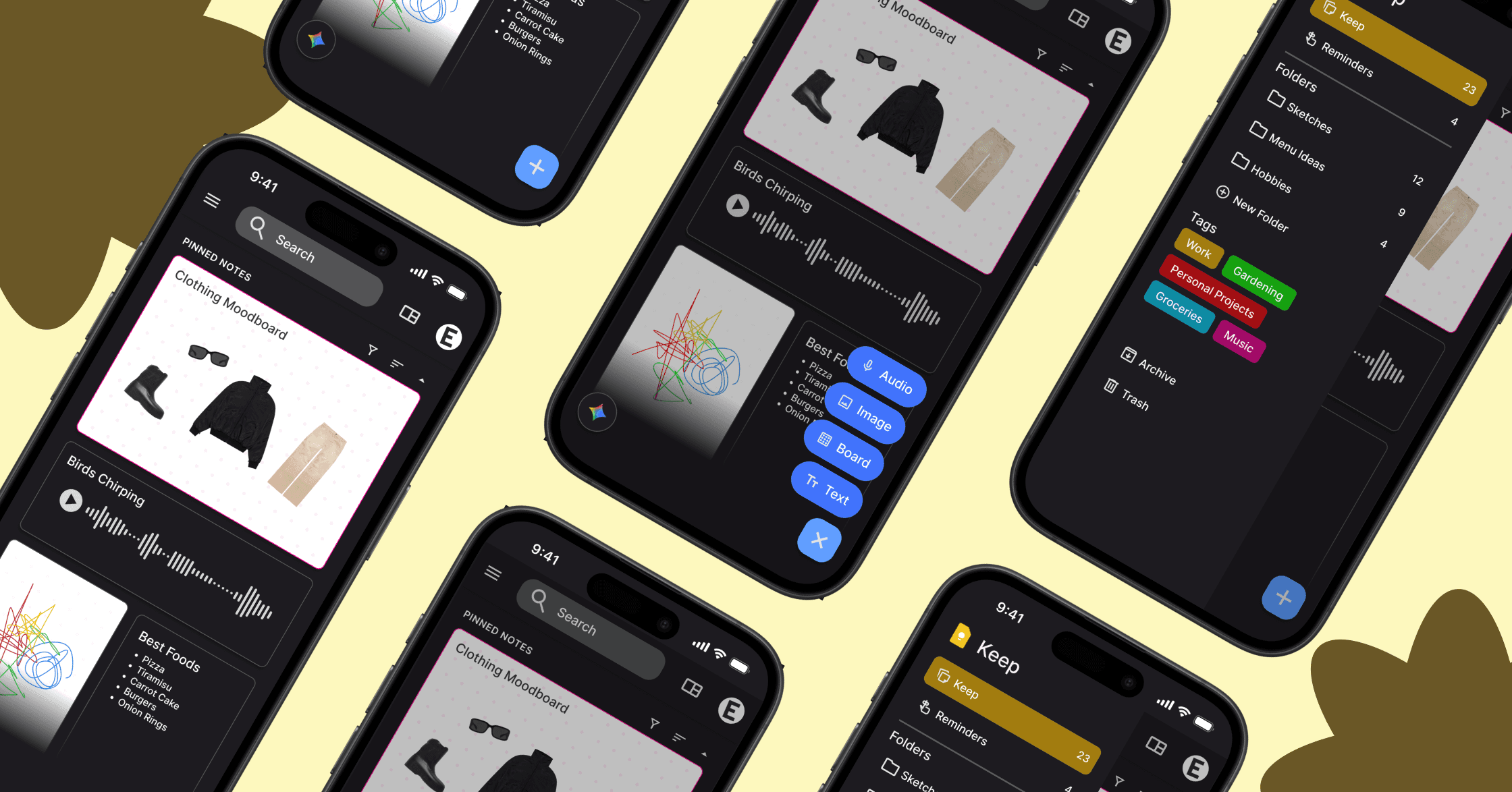
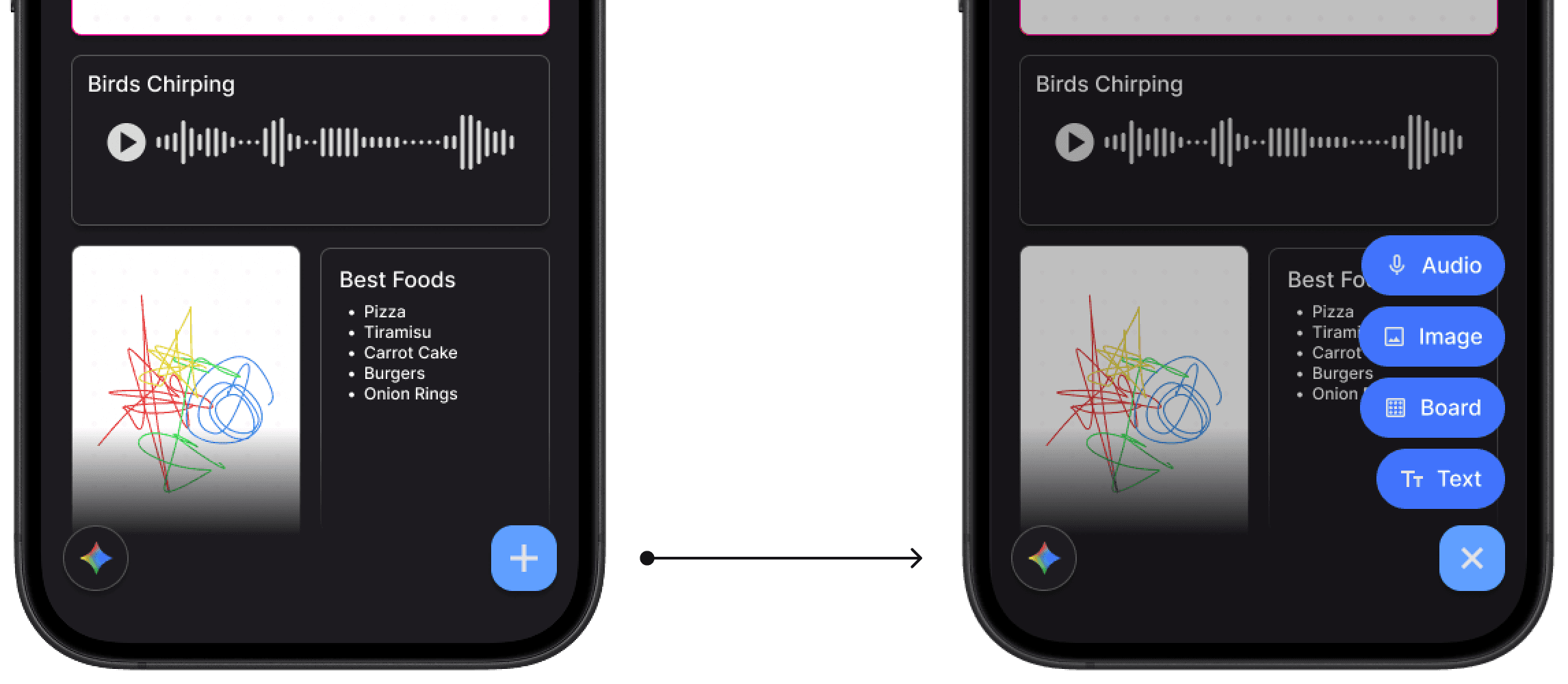
Condensed FAB System
The final direction replaced the persistent "Take a note..." bar from desktop with a Gemini and an expandable FAB button for mobile, originally inherited from current Android experience. Tapping the FAB reveals four clearly labeled note types - Audio, Image, Board, and Text giving users direct access to every input mode in two taps without crowding the interface. This preserved the speed of the original note bar while creating room for the expanded note type system. The desktop retained its persistent toolbar with customization, keeping the two surfaces distinct but functionally consistent.

Design
Breakdown
*
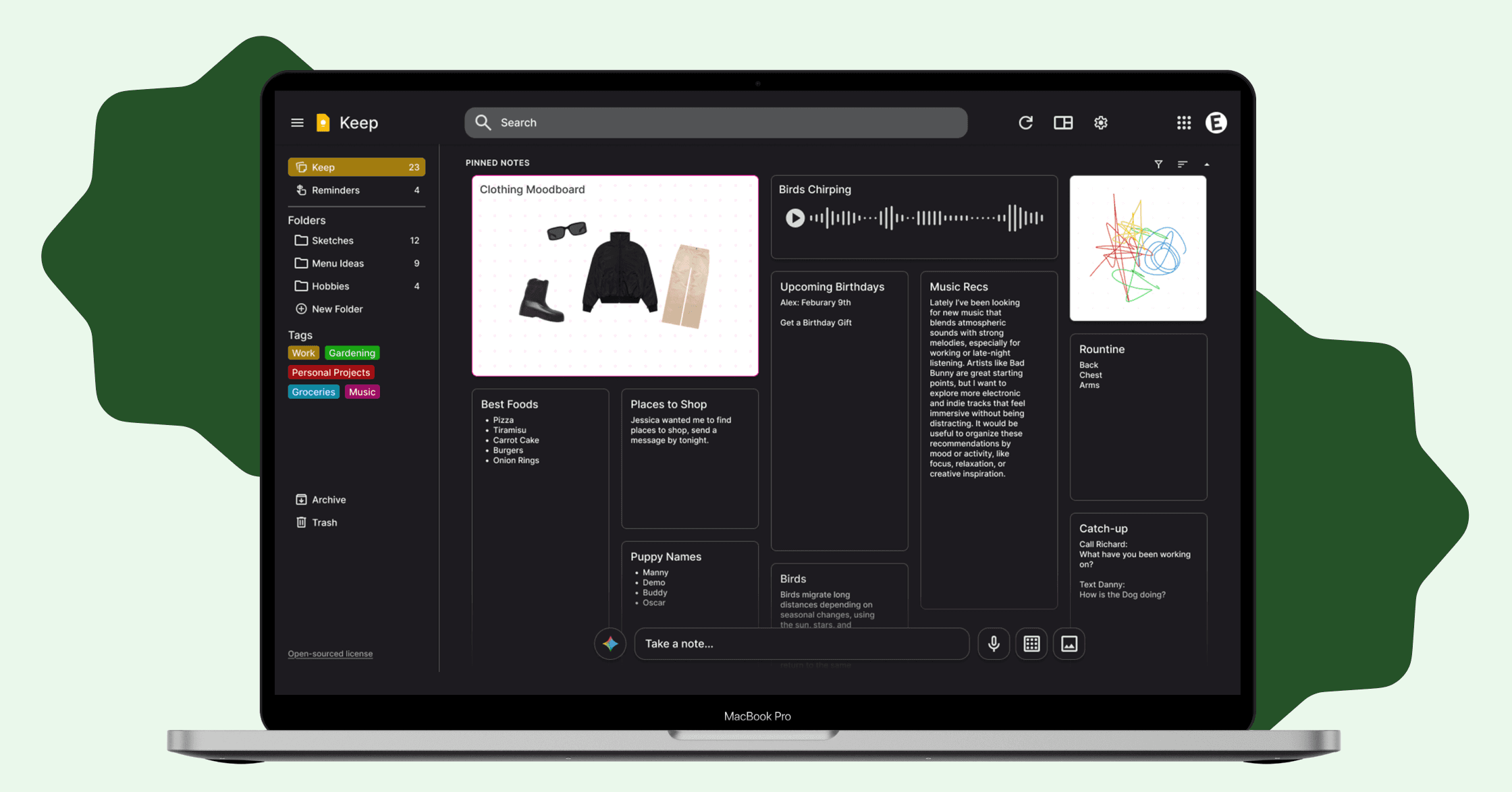
A customizable taskbar designed for fast, intentional note creation
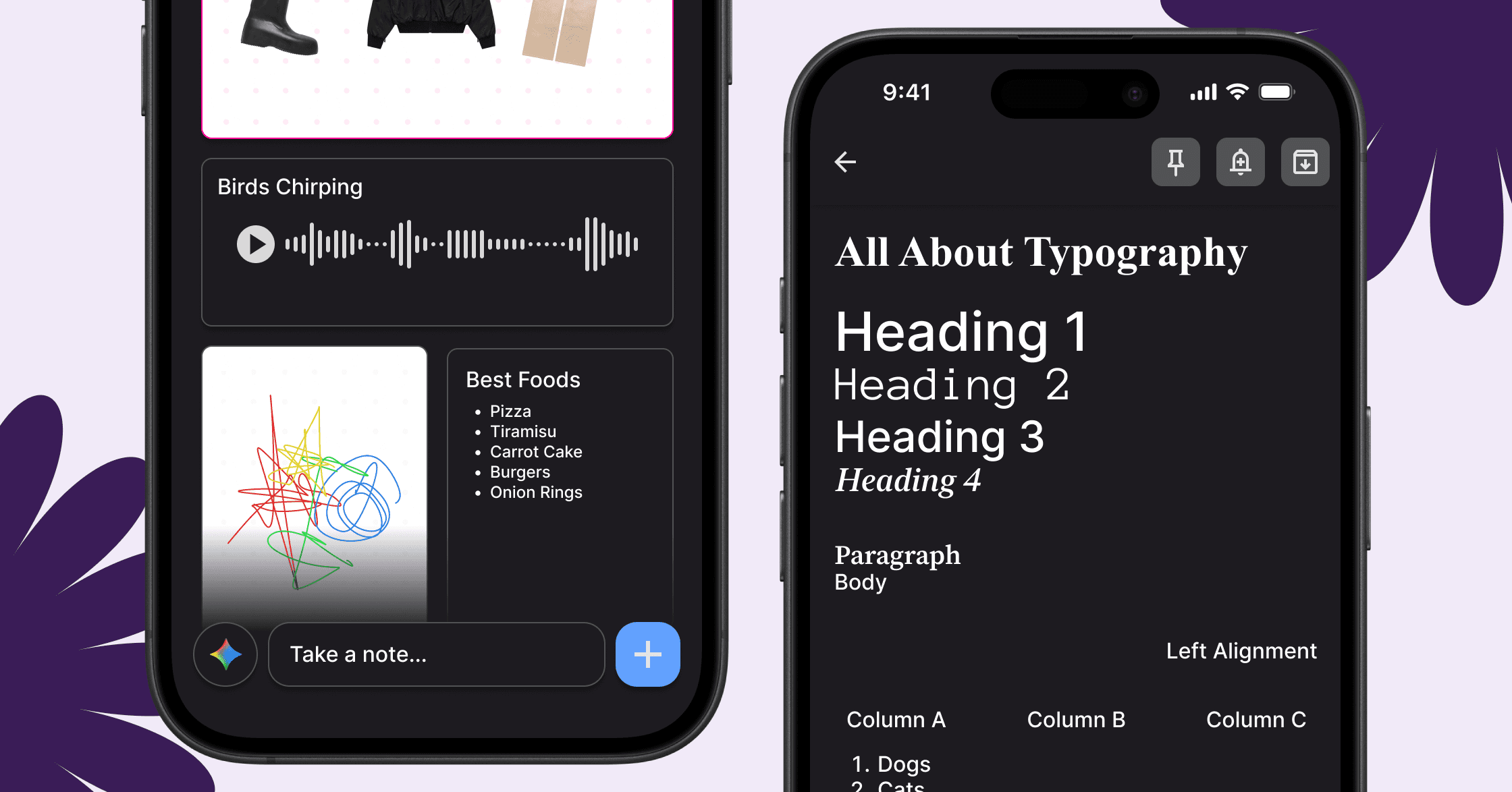
The redesigned taskbar provides persistent access to all note types and Gemini, with an edit mode that lets users prioritize their most-used tools. On mobile, the persistent "Take a note..." bar replaced with a Gemini button anchored bottom-left and an expandable FAB bottom-right revealing notetaking capabilities. This preserves speed while reducing friction and visual clutter across both platforms.


Gemini Integration
Gemini acts as a tool to the note-taker not a replacement for their thinking. Three integration modes were introduced, each designed to improve clarity and structure without generating content or disrupting user ownership of ideas:

Auto-Organization
Gemini reduces the need to manually filter through large note libraries by suggesting tags and folder organization schemes based on existing content patterns.

Layout Suggestions
As a note grows in length and complexity, Gemini suggests layouts based on what's being written giving structure to the note before it becomes unwieldy o recommends export to Docs.
Final Design
*